
News
- Home
- The Software-Based Medical Display Calibration ROI
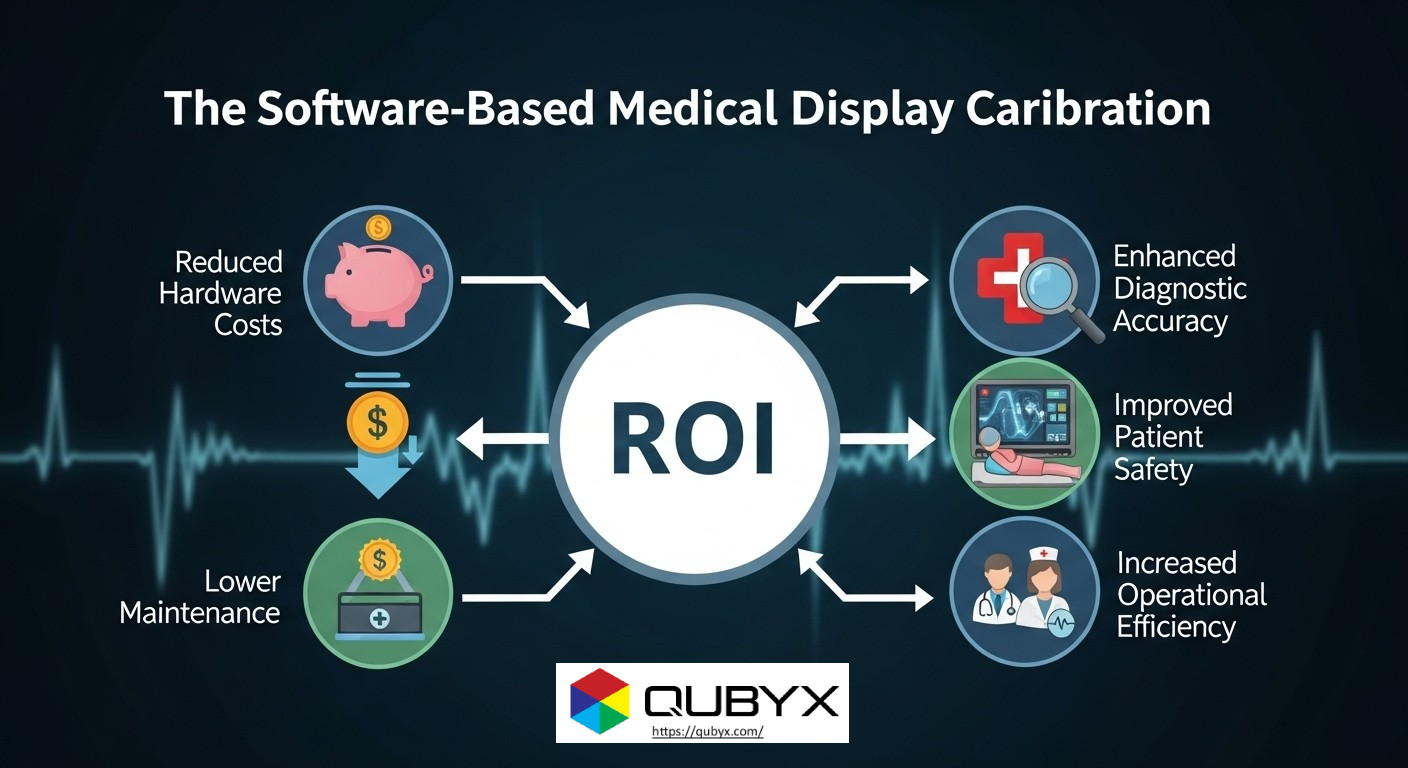
The Software-Based Medical Display Calibration ROI
- October 28, 2025
- QUBYX Team
Beyond the Expensive Monitor: The Surprising ROI of Software-Based Medical Display Calibration
Executive Summary
Hospitals don’t need to keep buying premium “medical-grade” monitors to achieve diagnostic-grade performance. A modern, software-first calibration strategy can make commodity or mid-range professional displays perform to standard—while continuously proving compliance. The result is lower capital costs, lower lifecycle costs, higher uptime, and auditable quality that satisfies radiology leadership, biomedical engineering, and regulators alike for Software-Based Medical Display Calibration ROI.
Why hardware-centric strategies cost more than you think
-
High CAPEX lock-in Software-Based Medical Display Calibration ROI
“Medical-grade” monitors bundle proprietary LUT hardware, built-in sensors, and vendor-specific QA suites. Upfront price premiums stack up across a fleet and create a single-vendor path for replacements, spares, and accessories. -
Hidden OPEX
-
Annual service contracts and on-site recalibrations
-
Vendor visits for acceptance/constancy tests
-
Asset downtime coordinating physical interventions
-
Shipping/loaners for RMAs
-
-
Fleet sprawl and lifecycle mismatch
Radiology fleets rarely refresh all at once. Mixing generations and models makes uniformity hard, pushing teams toward expensive like-for-like replacements rather than standard-based Medical Display Calibration across diverse hardware.
What Software-Based Medical Display Calibration Actually does
A robust software solution (e.g., PerfectLum from QUBYX or similar class tools) delivers the same clinical Medical Display Calibration targets, without hardware lock-in:
-
Standard-driven grayscale and luminance response
Calibrates to DICOM Part 14 GSDF with conformance checks and acceptance/constancy testing aligned with QA frameworks (e.g., AAPM TG18/TG270, DIN 6868-157/-57, and hospital policy). -
Vendor-neutral color & tone management
ICC/3D-LUT workflows map each display to the desired response (GSDF for monochrome; calibrated color for multimodality reading), enabling uniform appearance across mixed fleets. -
Remote QA & fleet governance
Central dashboards track compliance, trend luminance/contrast drift, flag out-of-tolerance devices, and schedule automated recalibration—ideal for remote radiologists and multi-site networks. -
Workflow automation
Silent, scheduled checks (overnight or low-use windows) minimize disruption while generating audit-ready logs for inspections and accreditation.
The Medical Display Calibration ROI Logic in Plain Language
Medical Display Calibration ROI comes from replacing CAPEX premiums and service overhead with software licenses, automation, and standard PC displays—while preserving diagnostic integrity.
Primary savings drivers
-
Acquisition: Swap a large share of premium monitors for mid-tier professional displays validated by software calibration.
-
Service: Fewer vendor visits; predictable, remote QA.
-
Uptime: Less downtime waiting for field techs or bench tests.
-
Useful life: Keep panels in service longer by tracking and correcting drift until they truly fail acceptance thresholds.
-
Scalability: Add remote workstations without buying another proprietary kit.
Risk controls
-
Acceptance testing at install, periodic constancy tests, documented logs, and alerting ensure that any panel falling out of spec is caught promptly—and either recalibrated or retired.
A simple TCO comparison for Medical Display Calibration
Assumptions you can adapt
-
Fleet size: 40 reading displays (mix of dual-head workstations and remote setups)
-
Time horizon: 5 years
-
Hardware premium (medical-grade vs pro-grade): $1,500 extra per unit
-
On-site service: $250 per visit × 2 visits/year/device (or equivalent internal labor + downtime)
-
Software licensing & photometer: $180–$250 per device/year (volume-tiered), shared meters for acceptance/spot checks
Five-year view (illustrative)
-
Hardware premium avoided: 40 × $1,500 = $60,000
-
On-site service avoided or reduced: 40 × 2 × $250 × 5 = $100,000 (replace with your internal hourly rates or vendor fees)
-
Software licensing: 40 × $220 × 5 ≈ $44,000
-
Net indicative savings: $60,000 + $100,000 − $44,000 = $116,000 over five years—while improving auditability and uptime.
Tip: even if you retain some high-end panels for specific use cases (e.g., mammography), moving the rest of the fleet to software-calibrated pro displays still unlocks the majority of savings.
Quality & Compliance for Medical Display Calibration: Matching the Bar
“Cheaper displays” ≠ “lower quality.” The key is standards conformance and proof:
-
Target profiles: GSDF curve, luminance range (Lmax/Lmin), ambient light constraints, and uniformity checks matched to your policy.
-
Automated logs: Every calibration and QC test produces timestamped records (pass/fail, Δ from target, corrective action).
-
Trend analysis: Drift rates identify panels nearing end-of-life before image quality risk appears in clinical use.
-
Policy alignment: Map acceptance/constancy intervals to ACR, AAPM, IEC 62563-1, local regulations, and internal governance.
With this, clinical leadership can sign off confidently because you’re measuring, managing, and documenting performance rather than trusting labels.
Where Software-First Medical Display Calibration Shines
-
Multi-facility radiology networks
Central command + local autonomy. Standardize visual response across locations and vendors. -
Hybrid/remote reading
Extend enterprise calibration and QA to home workstations with the same rigor and alerts. -
Budget-constrained expansions
New rooms, seasonal overflow, or research pods come online with calibrated pro-grade screens, not six-figure monitor orders. -
Lifecycle optimization
Keep reliable panels in spec for an extra 12–24 months via drift correction—cutting refresh spikes.
Implementation of Medical Display Calibration Blueprint (90 days to “audit-ready”)
Phase 1: Define & baseline (Weeks 1–3)
-
Approve target standards (GSDF, luminance range, uniformity thresholds, ambient light policy).
-
Inventory displays (model, age, hours, current status).
-
Pilot: calibrate 5–10 workstations (mixed vendors/sites), run acceptance tests, generate baseline reports.
Phase 2: Rollout & automate (Weeks 4–8)
-
Deploy the Medical Display Calibration agent and central QA server; connect to directory/asset systems.
-
Schedule overnight calibrations and weekly constancy checks.
-
Configure alerting (email/ITSM) for out-of-tolerance events.
Phase 3: Govern & optimize (Weeks 9–12)
-
Review drift trends; set policy for proactive replacement.
-
Tag critical readers (e.g., breast imaging) with tighter thresholds.
-
Train biomed/IT to interpret dashboards and export audit bundles.
Deliverables by Day 90:
-
Fleet-wide conformance status with pass/fail history
-
Exceptions list and action log
-
Replacement plan based on data, not guesswork
KPI Menu for Ongoing Value Tracking | Medical Display Calibration
-
% of fleet in-tolerance (weekly/monthly)
-
Mean time to recalibration after drift alert
-
Unplanned downtime (reader hours lost)
-
Cost per compliant workstation per year (all-in)
-
Δ in diagnostic turnaround time (TAT) tied to availability
-
Extended service life (months gained vs. prior cycle)
Addressing Common Objections | Medical Display Calibration
-
“Our radiologists prefer vendor X panels.”
Keep them where essential. Calibrate the rest. Hybrid strategies deliver 70–80% of the savings. -
“Auditors ask for brand-specific reports.”
Standards-based QA reports are brand-agnostic and typically more rigorous, with explicit targets, variances, and timestamps. -
“Home environments vary.”
Enforce ambient light checks, lock calibrated profiles, and use periodic constancy tests. Non-compliant stations trigger alerts or are blocked from diagnostic sessions until corrected.
Practical Purchasing Notes
-
Choose displays with adequate luminance headroom (so calibration doesn’t sit at the panel’s limits), stable backlights, and known uniformity.
-
Standardize on a small number of pro-grade models to simplify spares and profiles—even across multiple vendors.
-
Maintain a small pool of reference-grade monitors for use cases demanding maximum uniformity (e.g., mammography).
-
Own a reliable external photometer for acceptance tests and spot verification; automate everything else.
The Bottom Line | Medical Display Calibration
A software-first Medical Display Calibration and QA program shifts you from CAPEX-heavy, vendor-locked hardware to a standards-driven, auditable, vendor-neutral model. You’ll spend less, roll out faster, extend useful life, and maintain (or improve) diagnostic quality—with better evidence for regulators and accreditation bodies.
In a world where every pixel matters, PerfectLum proves that software innovation can deliver clinical precision without financial compromise. It’s not just calibration—it’s the democratization of diagnostic imaging.
To secure Medical Display Calibration with precision while reducing the recurring costs of proprietary hardware, the answer is clear: transition to a Calibration Software platform like QUBYX OS Tools (Free) and PerfectLum today. Now, you easily pay less for Radiology.
Tags:
Medical Display Calibration, software calibration, DICOM GSDF, PerfectLum, QUBYX, hospital QA, radiology display, cost saving, CAPEX reduction, imaging quality
Related Posts
- April 12, 2026
- News
- April 8, 2026
- News

- April 6, 2026
- News