
News
- Home
- How QUBYX OS Tools Improve Color Consistency
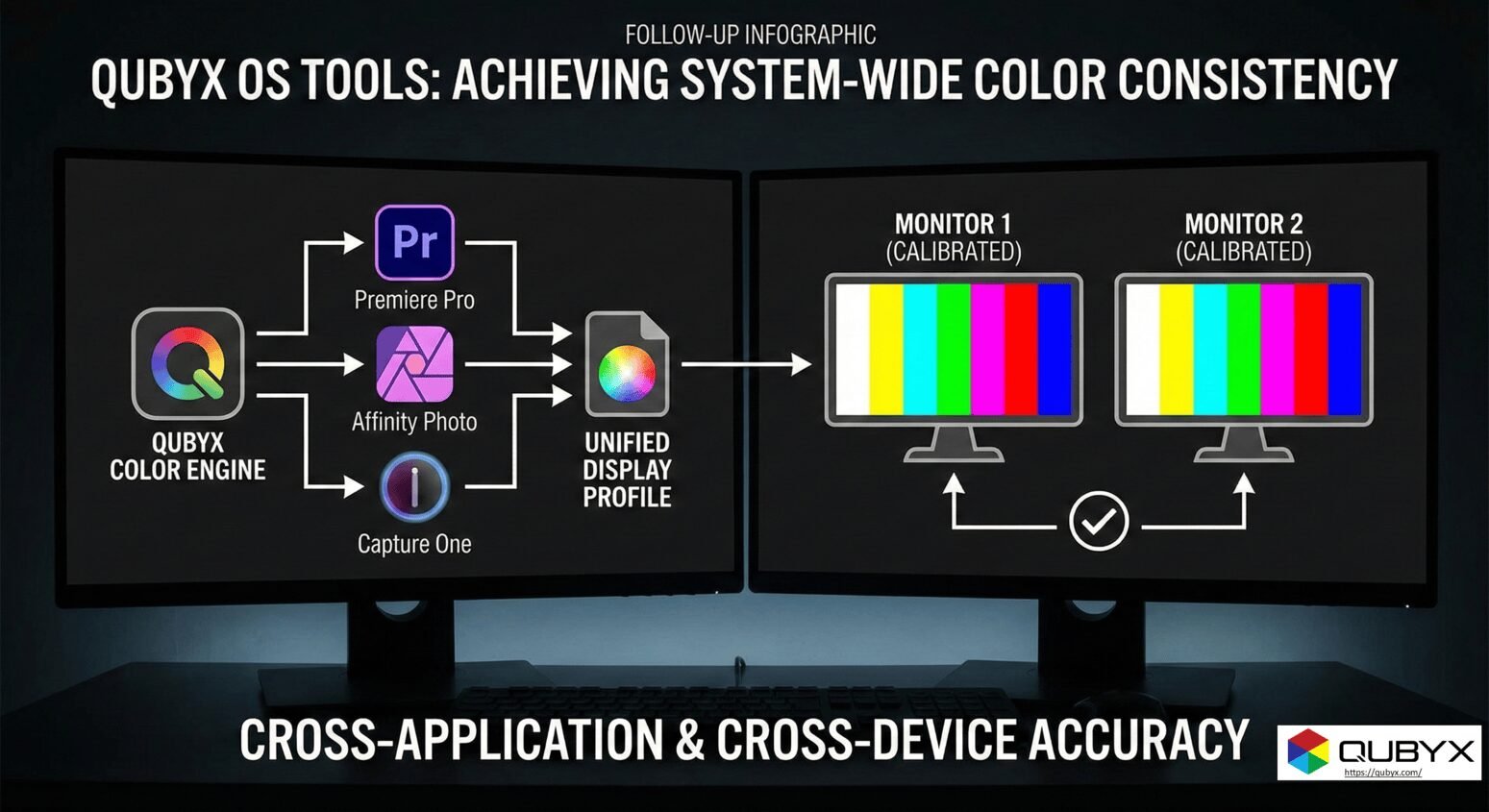
How QUBYX OS Tools Improve Color Consistency
- November 24, 2025
- QUBYX Team
How QUBYX OS Tools Improve Color Consistency Across Editing Software
Color consistency can make or break professional visual workflows. Whether you’re grading medical images, retouching photos, designing for print, or building complex geospatial maps, you need your colors to look the same in every application—Photoshop, Lightroom, PACS viewers, DICOM workstations, pre-press RIPs, and beyond.
That’s where QUBYX OS Tools come in. Designed as advanced color consistency tools, they help unify color behavior across multiple editing and viewing applications, operating systems, and displays.
In this post, we’ll explore how QUBYX OS Tools work behind the scenes, why they matter for cross-platform workflows, and how they can transform day-to-day accuracy for professionals.
Why Color Consistency Is So Hard to Maintain
Before looking at solutions, it helps to understand why color consistency often falls apart.
1. Different Color Engines and Rendering Intents
Each software application has its own color management engine and default settings:
-
One app may default to sRGB, another to Adobe RGB, and another to Display P3.
-
Rendering intents (Perceptual, Relative Colorimetric, etc.) can differ.
-
Internal processing pipelines may not interpret ICC profiles in exactly the same way.
The result: the same file can appear slightly different in each application.
2. Device and OS Fragmentation
Color is influenced by an entire chain, not just the file:
-
Monitors with different gamuts, contrast, and uniformity
-
OS-level color management (macOS vs. Windows)
-
Graphics drivers and LUT handling
-
Calibration / profiling quality and frequency
If any link in this chain is not managed correctly, color consistency breaks.
3. Inconsistent Calibration and ICC Profiles
Many workflows rely on:
-
Generic ICC profiles instead of device-specific ones
-
Old, poorly created profiles
-
Monitors that are not properly calibrated or drift over time
Without robust calibration and tightly controlled ICC behavior, advanced software can’t “fix” color on its own.
Where QUBYX OS Tools Fit In
QUBYX OS Tools are designed to sit at the system level, bridging the gap between:
-
Hardware (displays, LUTs, GPUs)
-
Operating systems (macOS, Windows)
-
Editing and viewing applications (PACS, DICOM viewers, Adobe apps, CAD, GIS, etc.)
As color consistency tools, they help ensure that all applications are referencing the same:
-
Calibration state
-
ICC profiles
-
Tone response and grayscale behavior
-
Gamut mapping and luminance targets
This creates a common “color baseline” that reduces app-to-app variation.
Key Ways QUBYX OS Tools Improve Color Consistency
1. Hardware-Level Display Calibration
First, QUBYX OS Tools work closely with calibration software (e.g., PerfectLum) to:
-
Measure the display with a supported colorimeter or spectrophotometer
-
Target specific standards (e.g., DICOM GSDF for medical, custom gamma 2.2 for graphics, etc.)
-
Load precise LUT corrections into the GPU or monitor
This means:
-
Grayscale and gamma are linear and predictable
-
Luminance and contrast are matched to industry or institutional standards
-
Different displays in the same workflow behave more alike
Once displays are calibrated and stabilized, application-level differences shrink dramatically.
2. Centralized ICC Profile Management
QUBYX OS Tools help create and manage high-quality ICC profiles that describe the calibrated state of each display:
-
Profiles are generated from real instrument measurements
-
Gamut, white point, tone response curves, and matrix/LUT data are accurately modeled
-
Profiles are registered correctly at the OS level so all applications can use the same display description
Because these ICC profiles are consistent and standards-aligned, editing software doesn’t have to guess what your monitor is doing. It knows.
Result: When Photoshop, a PACS viewer, and a web browser all reference the same monitor profile, the same image appears much more consistent.
3. 3D-Linked ICC Profiles and Advanced Color Mapping
Traditional ICC profiles often describe only simple relationships (e.g., one device to a profile connection space). QUBYX OS Tools can support more advanced 3D-linked ICC workflows, where:
-
Multiple color spaces (sRGB, Adobe RGB, DICOM, custom LUT spaces) are linked
-
3D lookup tables (3D LUTs) model nonlinear behaviors more precisely
-
Complex grayscale and color behavior is mapped more faithfully across applications
This is especially powerful for:
-
Medical imaging, where DICOM GSDF grayscale tracking must be preserved
-
Pre-press and proofing, where device-to-device gamut mapping must be predictable
-
Geospatial and satellite imaging, where subtle color differences carry analytical meaning
By using 3D-linked profiles and advanced LUTs, QUBYX OS Tools reduce color differences that simpler workflows can’t handle.
4. Cross-Platform Consistency (macOS & Windows)
Mixed environments are increasingly common:
-
Radiologists use macOS for tele-reading and Windows in hospitals
-
Designers switch between Mac laptops and Windows workstations
-
Engineering and GIS teams use specialized Windows tools and Mac-based review stations
QUBYX OS Tools aim to normalize color behavior across operating systems by:
-
Applying consistent calibration targets and LUT corrections
-
Ensuring ICC profiles are interpreted correctly on both platforms
-
Minimizing OS-specific variations in gamma and color handling
The result is a more predictable cross-platform experience, where “it looked different on my other machine” stops being a daily complaint.
5. Application-Aligned Color Workflows
Even when every device is perfectly calibrated, software settings can still cause mismatches. QUBYX OS Tools support workflow-aligned configurations, helping teams:
-
Use the same working spaces (e.g., sRGB, Adobe RGB, DCI-P3) across applications
-
Standardize rendering intents and soft-proofing settings
-
Align viewing conditions (ambient light, luminance, contrast) with chosen standards
This turns color management from an individual preference into a standardized, repeatable process.
Real-World Benefits for Different Professionals
For Medical Imaging and PACS Workflows
-
Reliable DICOM GSDF compliance across different workstations
-
More consistent grayscale perception for diagnostics
-
Confidence that QA measurements and real-world viewing match
For Photographers and Designers
-
Images look similar in Photoshop, Lightroom, browsers, and proofing tools
-
Less time spent troubleshooting “why does this look different there?”
-
More predictable print results thanks to accurate monitor-to-print relationships
For Pre-Press and Print Shops
-
Calibrated, profiled displays reduce last-minute corrections
-
Alignment with press ICC profiles and proofing standards
-
Happier clients who see what they’ll actually get in print
For GIS and Technical Imaging
-
Stable, accurate color maps for analytical work
-
Consistent viewing conditions across teams and locations
-
More confidence when comparing historical images on different systems
Best Practices to Maximize QUBYX OS Tools as Color Consistency Tools
To get the most from QUBYX OS Tools, follow a structured approach:
1. Start with Display Calibration
-
Use a supported instrument and recommended targets
-
Run calibration regularly (e.g., monthly or as required by regulation)
-
Treat calibration as part of your QA/maintenance routine, not a one-time task
2. Standardize ICC Profiles
-
Generate high-quality ICC profiles for each monitor
-
Avoid mixing generic and custom profiles on the same workstation
-
Use naming conventions so teams know which profile belongs to which display and target
3. Align Application Settings
-
Choose standard working spaces for your team or department
-
Document preferred rendering intents and soft-proof setups
-
Train users to check color settings before starting critical work
4. Control the Viewing Environment
-
Set reasonable luminance levels (not too dim, not overly bright)
-
Avoid extreme ambient light variations and reflections
-
For medical and print workflows, follow relevant environmental recommendations
5. Monitor and Document QA
-
Keep basic logs of calibration dates and targets
-
Use QUBYX tools for verification and periodic QA checks
-
In regulated environments (e.g., healthcare), align with local standards and guidelines
Why QUBYX OS Tools Stand Out as Color Consistency Tools
There are many calibration utilities on the market, but QUBYX OS Tools differ in a few important ways:
-
They look at the entire pipeline: hardware, OS, ICC, and applications.
-
They’re built with professional and regulated workflows in mind, not just casual use.
-
They support advanced profiling, including 3D-linked ICC and precise grayscale tracking.
-
They integrate naturally with calibration solutions like PerfectLum to form a complete color consistency toolkit.
If your goal is simply “make my screen look nicer,” basic tools may be enough. But if your goal is reliable, repeatable color across multiple editing applications and platforms, you need system-level color consistency tools. That’s the niche QUBYX OS Tools are built to fill.
Final Thoughts
Color consistency isn’t just an aesthetic luxury—it’s a productivity booster and, in some fields, a safety issue. By combining hardware-level calibration, robust ICC management, advanced 3D-linked profiles, and cross-platform alignment, QUBYX OS Tools act as powerful color consistency tools for demanding professional workflows.
Whether you’re diagnosing a patient, preparing a print run, or delivering mission-critical visual analysis, QUBYX OS Tools help ensure that what you see is accurate, consistent, and trustworthy—no matter which editing software you’re using.
QUBYX OS Tools – FAQ
1. What are QUBYX OS Tools?
QUBYX OS Tools are advanced system-level utilities designed to enhance color accuracy and consistency across macOS and Windows. They manage display calibration, ICC profiles, LUT behavior, and application-level color workflows, ensuring that every image appears consistent across editing software.
2. How do QUBYX OS Tools act as color consistency tools?
They standardize color behavior by aligning:
-
Display calibration
-
ICC profile management
-
Tone response curves
-
3D-linked LUT workflows
-
Cross-platform color behavior
This creates a unified color baseline so the same image looks identical across Photoshop, Lightroom, PACS viewers, GIS tools, and browsers.
3. Why does color often look different across editing apps?
Different applications use unique Color Consistency, working spaces, and rendering intents. Additionally, variations in display calibration and ICC profiles can produce inconsistent color output. QUBYX OS Tools eliminate these variations by forcing system-wide consistency.
4. How does display calibration improve color consistency?
QUBYX OS Tools integrate with calibration software (e.g., PerfectLum) to create hardware-level correction using LUTs. This ensures accurate luminance, gamma, grayscale tracking, and uniformity—key elements for achieving identical color across all editing platforms.
5. What are 3D-linked ICC profiles, and why do they matter?
3D-linked ICC profiles use advanced 3D LUT modeling to describe complex display behaviors. This is especially useful for medical imaging, pre-press, and geospatial work. With QUBYX OS Tools, these profiles enable more precise control over color and grayscale consistency across applications.
6. Will QUBYX OS Tools help if I work on both Windows and macOS?
Yes. Mixed-platform workflows often suffer from gamma differences, LUT handling variations, and profile mismatches. QUBYX OS Tools harmonize color across both operating systems, ensuring consistent viewing conditions regardless of the device.
7. Which industries benefit most from these color consistency tools?
QUBYX OS Tools are widely used in:
-
Medical imaging (DICOM GSDF compliance)
-
Photography & multimedia editing
-
Pre-press & print production
-
GIS & remote sensing
-
Display manufacturers and OEM testing
Any workflow requiring dependable color accuracy benefits significantly.
8. Can QUBYX OS Tools fix color differences caused by poor ICC profiles?
Yes. They generate and manage high-quality ICC profiles based on real instrument measurements. Instead of relying on generic profiles, QUBYX OS Tools ensure accurate color representation that all editing software can trust.
9. Do I need special hardware to use QUBYX OS Tools?
You need a supported colorimeter or spectrophotometer for calibration (e.g., X-Rite, Datacolor, or high-end medical-grade instruments). QUBYX software handles the rest—profiling, LUT updates, Color Consistency, and system integration.
10. How often should I calibrate my display?
For professional accuracy:
-
Medical imaging: Weekly or as per regulatory guidelines
-
Photography/design: Every 2–4 weeks
-
Print/Pre-press: Weekly
-
General use: Monthly
QUBYX OS Tools help automate reminders and ensure consistent calibration cycles.
11. Will QUBYX OS Tools make all my apps show the same colors?
Yes—within the limits of your hardware. When used with proper calibration and accurate ICC profiles, QUBYX OS Tools ensure that the same image appears consistent across:
-
Adobe apps
-
Browsers
-
PACS viewers
-
DICOM tools
-
CAD/GIS applications
-
Media players
It reduces the “Why does this look different in Photoshop?” problem dramatically.
12. Can QUBYX OS Tools help with printing accuracy?
Absolutely. By ensuring your monitor displays accurate color and matching it to printer ICC workflows, QUBYX OS Tools reduce print misalignment and provide a predictable soft-proofing environment.
13. How are QUBYX OS Tools different from basic calibration utilities?
Basic tools adjust only gamma and white point.
QUBYX OS Tools provide:
-
Medical-grade accuracy
-
3D-linked ICC workflows
-
Cross-platform color harmonization
-
Advanced LUT and grayscale control
-
Integration with DICOM, ICC v4, and custom standards
This makes them true professional color consistency tools, not just calibration apps.
14. How do QUBYX OS Tools support medical imaging Color Consistency?
They ensure:
-
Strict DICOM GSDF compliance
-
Device uniformity across multiple radiology stations
-
Stable grayscale tracking for diagnostics
-
Auditable QA and verification workflow
This improves diagnostic confidence and regulatory compliance.
15. Are QUBYX OS Tools suitable for teams with multiple displays?
Yes. Whether you manage 2 displays or 200 monitors, QUBYX OS Tools help standardize:
-
Calibration targets
-
ICC profiles
-
QA settings
-
Cross-platform viewing conditions
This provides an enterprise-wide color management strategy.
Get Started Today
Take control of your color workflow and budget.
• Get the Code & Docs
Clone the repository and dive into full documentation.
• git clone https://github.com/QUBYX-LLC/your-repo-name.git
• Explore Tutorials
Visit our GitHub for how-to guides, API references, and sample profiles.
In a world where every Pixel accuracy matters, PerfectLum by QUBYX proves that innovation can deliver clinical precision without financial compromise. It’s not just calibration—it’s the democratization of diagnostic imaging.
To secure Medical Display Quality Assurance with precision while reducing the recurring costs of proprietary hardware, the answer is clear: transition to a Calibration Software platform like QUBYX OS Tools (Free) and PerfectLum today. Now, you easily pay less for Radiology.
Tags:
Color Consistency, color consistency tools, QUBYX OS Tools, color accuracy software, ICC profile management, display calibration tools, 3D-linked ICC profiles, cross-platform color consistency, Windows and macOS color management, professional color calibration, monitor profiling tools, color workflow standardization, DICOM GSDF calibration, color grading consistency, digital imaging accuracy, medical display calibration tools, color management for editing software, system-level color correction, hardware LUT calibration, visual workflow optimization, image editing color matching, advanced color profiling tools
Related Posts
- April 12, 2026
- News
- April 8, 2026
- News

- April 6, 2026
- News