
News
- Home
- PerfectLum, OS Tools & QUBYXViewer Calibration Suite
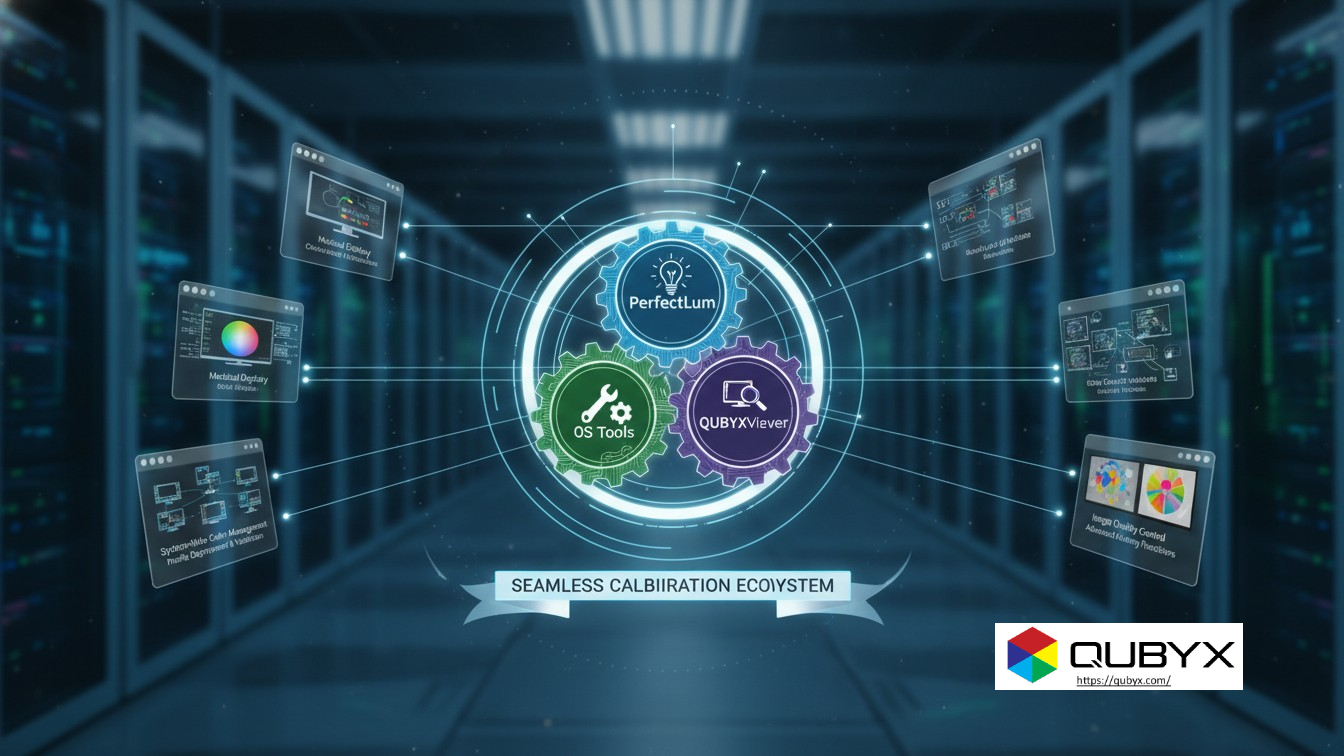
PerfectLum, OS Tools & QUBYXViewer Calibration Suite
- November 28, 2025
- QUBYX Team
PerfectLum, OS Tools & QUBYXViewer — Your Complete Calibration Ecosystem
When you rely on a screen to make critical decisions, “good enough” color and luminance is never good enough. Whether you are reading CT images, designing automotive interiors, validating geospatial data or reviewing prepress layouts, your display must be calibrated, verified and monitored over time.
That’s where the PerfectLum, OS Tools & QUBYXViewer calibration ecosystem comes in. Together, these three solutions from QUBYX form a complete, end-to-end environment for DICOM-grade accuracy, color consistency and quality assurance—from the operating system level to the final image review.
In this guide, we’ll explore how each component works, how they integrate, and why this ecosystem is a powerful choice for clinics, OEMs, PACS vendors, imaging centers, and color-critical industries worldwide.
Why Display Calibration Still Matters
Digital imaging has advanced dramatically, but one thing hasn’t changed: if your display is wrong, your decisions are at risk.
Common Problems Without Proper Calibration
-
Inconsistent luminance and contrast between workstations
-
Color shifts after GPU or OS updates
-
Unreliable grayscale rendering for medical images
-
Mismatch between acquisition and review systems
-
Failed compliance audits due to missing or outdated QA reports
For medical imaging, this can mean missed findings, inconsistent diagnoses and non-compliance with standards like DICOM Part 14 GSDF.
For prepress, photography, geospatial and automotive, it can mean costly rework, poor print match, unreliable color decisions and unhappy customers.
A modern imaging workflow needs more than a one-off manual calibration. It needs a calibration ecosystem:
-
Integrated with the operating system
-
Aware of your displays and their capabilities
-
Able to create, apply and monitor calibration profiles
-
Capable of generating documentation and QA reports on demand
That is exactly what the QUBYX ecosystem is designed to deliver.
Meet the QUBYX Calibration Ecosystem
The QUBYX ecosystem is built around three core products, each handling a different layer of your imaging stack:
-
PerfectLum – display calibration and QA engine
-
OS Tools – system-level color and profile management
-
QUBYXViewer – accurate image display and visual verification
Together, they create a closed calibration loop: from measurement and profile creation to application, monitoring and viewing.
PerfectLum – The Calibration & QA Powerhouse
PerfectLum is the heart of the ecosystem. It’s designed to measure, calibrate and verify your displays, whether they are medical diagnostic monitors, surgical displays, dental screens, or high-end color monitors.
Core Capabilities of PerfectLum
-
Hardware & software calibration
-
Uses supported sensors to measure luminance and chromaticity
-
Can drive supported displays’ internal LUTs (where available)
-
-
DICOM, sRGB, Gamma and custom curves
-
Calibrate to DICOM GSDF for medical imaging
-
Use standard gamma (e.g., 2.2) or custom response curves for graphics
-
-
Automatic & scheduled re-calibration
-
Set regular QA routines to maintain consistency over time
-
Receive alerts when a monitor drifts out of tolerance
-
-
Detailed QA & compliance reports
-
Before/after calibration metrics
-
Pass/fail indicators against defined criteria
-
Documentation for audits and regulatory requirements
-
PerfectLum turns display calibration from a one-time project into a repeatable, documentable QA process.
OS Tools – Calibration That Lives at the System Level
While PerfectLum handles measurement and profile creation, OS Tools ensures that these calibrations actually control the pixels the way you expect.
What OS Tools Brings to Your Workflow
-
Operating system integration
-
Manages and applies ICC profiles at the OS level
-
Ensures consistent color management across applications
-
-
Multi-monitor and multi-GPU support
-
Assigns the correct calibration to each connected display
-
Keeps track of changes in connections and configurations
-
-
Advanced profile handling
-
Supports complex ICC profiles for different devices
-
Works hand-in-hand with PerfectLum for seamless deployment
-
In simple terms, OS Tools is the bridge between your calibration data and the real-world pixels shown on every monitor in your fleet. Without a solid system-level layer like this, even the best calibration can be undermined by OS changes or driver updates.
QUBYXViewer – Trust What You See
Even with a calibrated system, you need a viewer that respects profiles, curves and luminance targets. QUBYXViewer handles that final step: accurate, profile-aware display of your images.
How QUBYXViewer Completes the Ecosystem
-
Profile-aware image rendering
-
Uses the active calibration and ICC profiles
-
Ensures the image you see reflects the calibrated state
-
-
Support for clinical and technical workflows
-
Ideal for medical image viewing, QA verification, and visual checks
-
Helpful as a reference viewer when comparing images across devices
-
-
Consistency checks
-
Lets you see how images behave on different calibrated displays
-
Helps verify that your pipeline—from acquisition to display—is aligned
-
While PerfectLum create and apply the calibration, QUBYXViewer is where you visually experience the result with confidence.
How the Ecosystem Works Together (Step-by-Step)
To understand the power of the ecosystem, it helps to walk through a typical workflow.
Step 1: Measure & Calibrate with PerfectLum
-
Connect your supported sensor
-
Choose your target (e.g., DICOM GSDF, specific gamma, luminance target)
-
Run the calibration routine
-
PerfectLum generates and stores a calibration profile
-
Verification ensures your display meets tolerance limits
Step 2: Apply System-Wide Profiles with OS Tools
-
OS Tools assigns the correct ICC profile to each display
-
It ensures that the operating system and GPU use these profiles correctly
-
Multi-monitor setups are mapped and maintained
Step 3: View & Verify with QUBYXViewer
-
Open your clinical, prepress or technical images in QUBYXViewer
-
Confirm that grayscale, color and contrast values align with expectations
-
Use visual verification alongside numerical QA metrics
Step 4: Maintain Quality Over Time
-
PerfectLum runs scheduled QA checks
-
Drift is detected early, and the user is prompted for re-calibration
-
QA reports document stability, compliance and performance
This continuous cycle makes the QUBYX stack a true calibration ecosystem, not simply a standalone utility.
Who Benefits from the QUBYX Calibration Ecosystem?
Because the ecosystem is device-agnostic and workflow-flexible, it serves a wide range of industries that depend on accurate displays.
Medical Imaging & Healthcare
-
Radiology, mammography, CT, MRI, ultrasound and dental imaging
-
PACS workstations, diagnostic and review monitors
-
Compliance with DICOM GSDF and QA standards
-
Clear documentation for internal QA and external audits
PACS Vendors & Imaging OEMs
-
Bundle PerfectLum, and other QUBYX Software Tool with your hardware
-
Offer end-customers a ready-to-use QA and calibration solution
-
Reduce support tickets related to “wrong colors” or “dark images”
-
Strengthen your brand with DICOM-grade, calibrated viewing out of the box
Prepress, Graphic Design & Photography
-
Reliable soft-proofing for print workflows
-
Color-accurate design and layout review
-
Predictable color across monitors and locations
Automotive, Geospatial & Industrial Imaging
-
Accurate color and contrast in test labs, simulators and control rooms
-
Precise rendering of satellite imagery, maps and technical visualizations
-
Reduced risk in decision-making environments where visual data is critical
If your work depends on what you see on-screen, the PerfectLum and Other QUBYX Software calibration ecosystem can help protect quality, reputation and outcomes.
Technical Highlights That Set QUBYX Apart
While marketing language is useful, what really matters are the technical details behind the ecosystem:
-
Support for DICOM and standard gamma calibrations
-
Hardware LUT access for compatible displays
-
Extensive reporting for QA, compliance and long-term tracking
-
Multi-platform, multi-monitor capability
-
Tight integration between calibration (PerfectLum), OS-level profile management (OS Tools) and image viewing (QUBYXViewer)
This combination is what turns individual tools into a coherent, reliable calibration infrastructure.
Getting Started with the QUBYX Calibration Ecosystem
Whether you’re a single imaging center or a global OEM, onboarding can follow a simple path:
-
Define your targets
-
DICOM GSDF for medical
-
Gamma + color space targets for graphics and industry
-
-
Deploy PerfectLum
-
Install across critical workstations
-
Map monitors and assign profiles
-
-
Integrate QUBYXViewer into your workflow
-
Use it for QA verification and clinical/technical viewing
-
Train key staff on interpreting QA reports and visual checks
-
-
Standardize QA policies
-
Define calibration intervals
-
Archive QA reports for audits and quality programs
-
The result is a repeatable, scalable calibration strategy that grows with your business and technology stack.
FAQs About PerfectLum, OS Tools & QUBYXViewer
1. Do I need all three products, or can I use them separately?
You can deploy each solution independently, but using a QUBYX Software gives you a much stronger, closed-loop calibration ecosystem—from measurement to real-world image display.
2. Is this only for medical imaging?
No. While the ecosystem is ideal for medical and dental imaging, it also supports prepress, photography, automotive, geospatial and other color-critical uses where consistent calibration and QA are important.
3. Can I manage multiple displays across a large organization?
Yes. The combination of PerfectLum and OS Tools is designed for multi-monitor, multi-site environments, helping you standardize calibration across networks and facilities.
4. How often should I recalibrate?
That depends on your regulatory environment and internal QA policies, but many users perform monthly or quarterly QA checks, with PerfectLum’s scheduling making this easy to automate.
5. What kind of documentation is available for audits and compliance?
PerfectLum generates detailed calibration and QA reports, including before/after measurements and pass/fail status against your defined criteria—ideal for internal quality systems and external inspections.
If you’re ready to explore collaboration, now is the time to connect—and discover what QUBYX can contribute to your mission.
In a world where every Pixel accuracy matters, PerfectLum by QUBYX proves that innovation can deliver clinical precision without financial compromise. It’s not just calibration—it’s the democratization of diagnostic imaging.
To secure Medical Display Quality Assurance with precision while reducing the recurring costs of proprietary hardware, the answer is clear: transition to a Calibration Software platform with QUBYX OS Tools (Free) and PerfectLum today. Now, you easily pay less for Radiology.
Tags:PerfectLum, QUBYX OS Tools, QUBYXViewer, DICOM calibration, medical imaging QA,display calibration software, color management, PACS workflow, ICC profiles, monitor quality assurance,
Related Posts
- May 24, 2026
- News
- May 16, 2026
- News
- May 14, 2026
- News